Compute Environments
Your Research Project in Computing Terms
Every research computing project has three questions:
The rest of this page answers the Where question — understanding the resources behind each environment: CPU cores, RAM, and storage.
Under the Hood
In Days 1 and 2, you wrote a Python script and ran it on the Yens interactively. But what is actually inside the machine running your code?
Inside every computer — your laptop, a Yen node, a cloud server — there are the same few physical components. The diagram below shows a Yen server opened up: the CPU is the processor chip, cores are the individual workers inside it (each runs code independently), and RAM is the fast memory the CPU reads from while working.
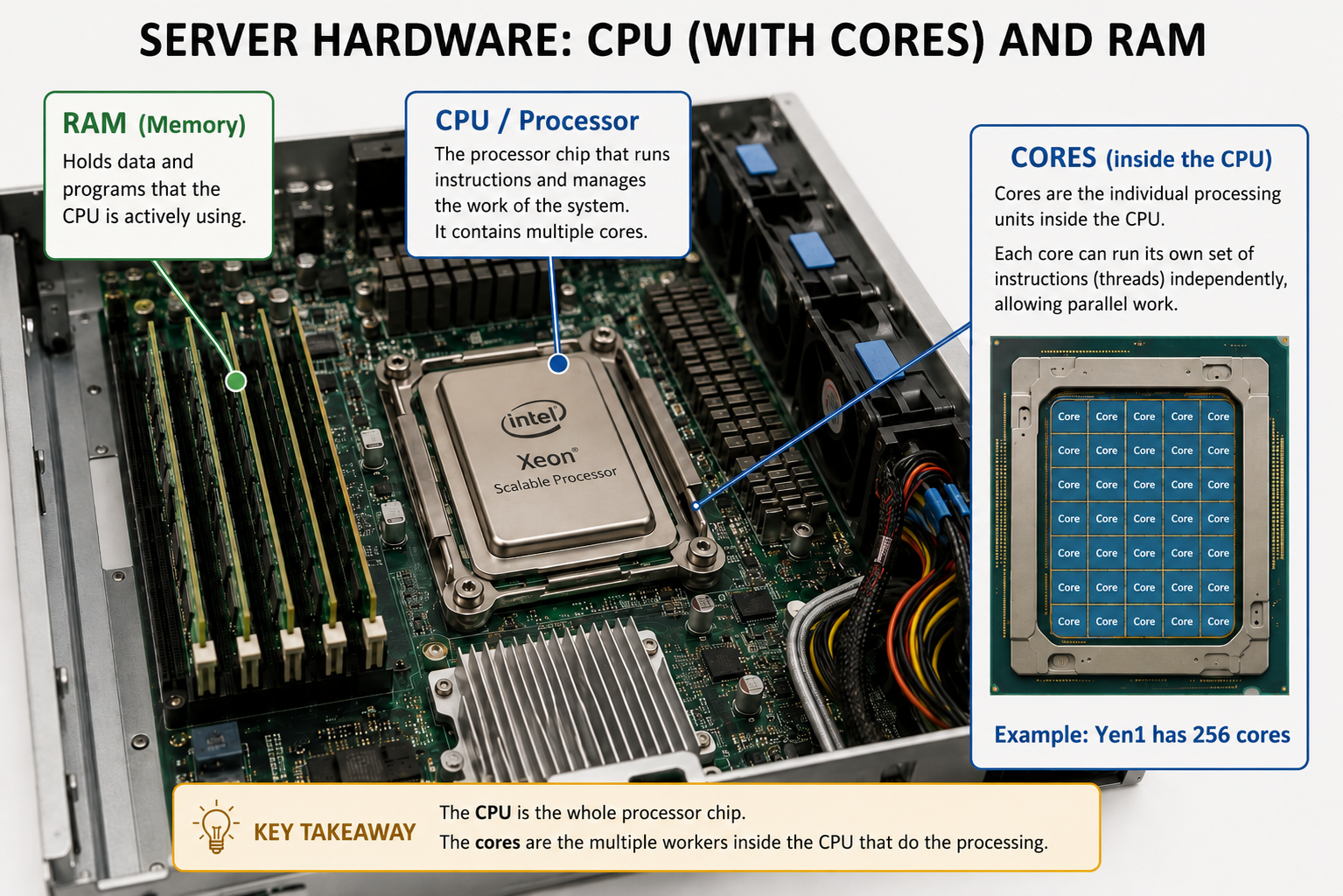
Today we’ll understand what each of these does when your script is running — and why they determine how fast (or slow) your code goes.
| Component | What it is |
|---|---|
| CPU | The processor chip — executes your code |
| CPU core | An individual worker inside the CPU — each runs independently |
| RAM | Fast memory the CPU reads from and writes to while working — limited in size |
| Storage (disk / file system) | Where your files live when nothing is running — large but slow |
| I/O (Input/Output) | Moving data from disk into RAM (read) and writing results back to disk (write) — the slowest step |
The Kitchen Analogy
To make these concepts concrete, we’re going to use a kitchen analogy that carries through the whole day — from your laptop to the Yens to the cloud. Your kitchen — your laptop — is all yours and only yours: a few burners (CPU cores), a small fridge (RAM), and a convenience store down the street (disk) that’s bigger than your fridge but slow to access. Your bike (disk I/O) can only grab a few things from the store at a time.
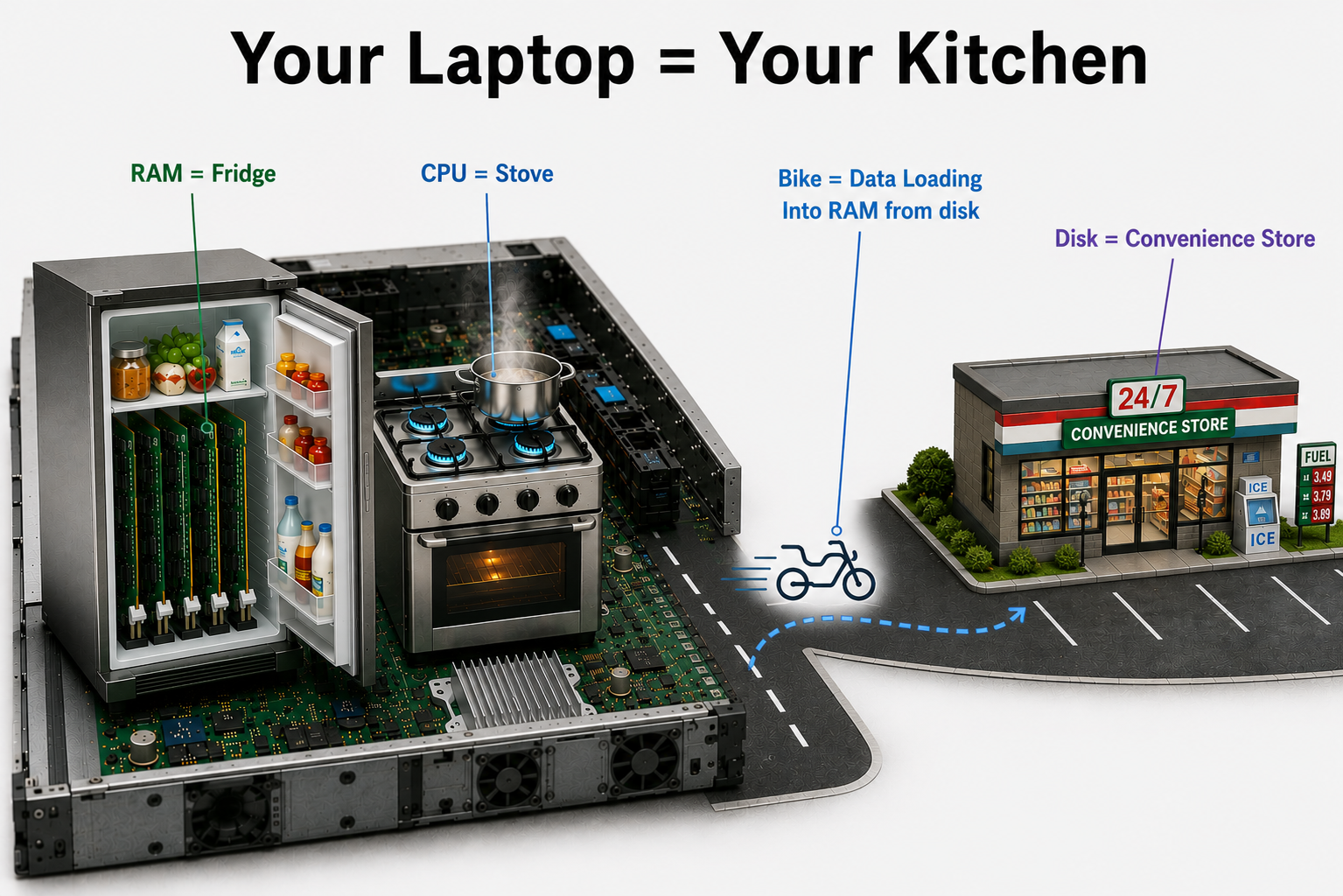
| Component | What it is | Kitchen analogy |
|---|---|---|
| CPU | The processor chip — executes your code | The stove |
| CPU core | An individual worker inside the CPU — each runs independently | A single burner |
| RAM | Fast memory the CPU reads from and writes to while working — limited in size | The fridge |
| Storage (disk / file system) | Where your files live when nothing is running — large but slow | The convenience store |
| I/O (Input/Output) | Moving data from disk into RAM (read) and writing results back to disk (write) — the slowest step | Biking to the store and back |
What happens when you run a script:
When you run python extract_form_3_one_file.py, four things happen in sequence:
- Load from disk — Python reads your script and data files from storage (the convenience store) onto the bike and hauls them into RAM.
- Into RAM — the data lands in the fridge. Now the CPU can reach it quickly without another trip to the store.
- CPU does the work — the stove fires up. Each CPU core executes the steps in your script against whatever is in the fridge.
- Save to disk — results get written back to storage so they’re there when you shut down.
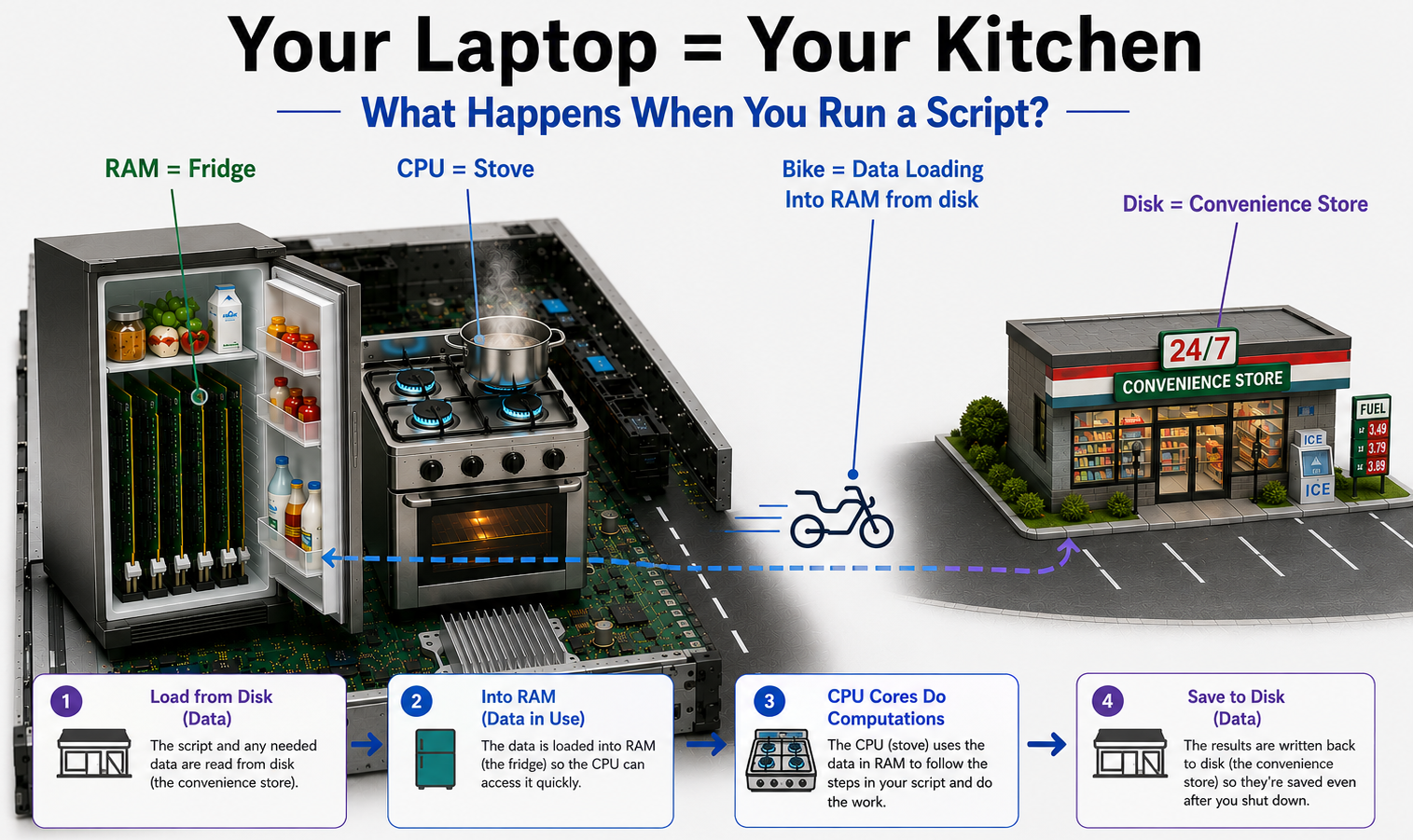
Here is that same flow as a moving picture. Notice the first leg (disk → RAM) is the slow one; once the data is close to the processor, the rest is quick:
The tricky part: reading from disk is slow. Reading from disk is orders of magnitude slower than reading from RAM. Your CPU can crunch through data in nanoseconds, but a disk read takes milliseconds — a million times longer. If your dataset is too large to fit in RAM all at once, your script keeps going back to disk mid-computation, and that is what makes jobs crawl. This is why knowing how much RAM your script needs matters — not just for the cluster, but on your laptop too.
Your script is a recipe — a numbered sequence of steps the CPU follows from top to bottom. Just like a recipe can say “make the sauce” and refer you to another page, a script can call functions or other scripts. Each call is a sub-recipe: the CPU pauses the main recipe, runs the sub-recipe to completion, then picks up where it left off.
# Recipe: pasta.py
# 1. Boil water
# 2. Add pasta
# 3. While pasta cooks:
#      → make_sauce()   ← calls another function (a sub-recipe)
# 4. Mix and serve
| Component | What it is | Kitchen analogy |
|---|---|---|
| CPU | The processor chip — executes your code | The stove |
| CPU core | An individual worker inside the CPU — each runs independently | A single burner |
| RAM | Fast memory the CPU reads from and writes to while working — limited in size | The fridge |
| Storage (disk / file system) | Where your files live when nothing is running — large but slow | The convenience store |
| I/O (Input/Output) | Moving data from disk into RAM (read) and writing results back to disk (write) — the slowest step | Biking to the store and back |
| Script | The sequence of steps the CPU follows to produce your output | The recipe |
Shared restaurant kitchen — the Yens
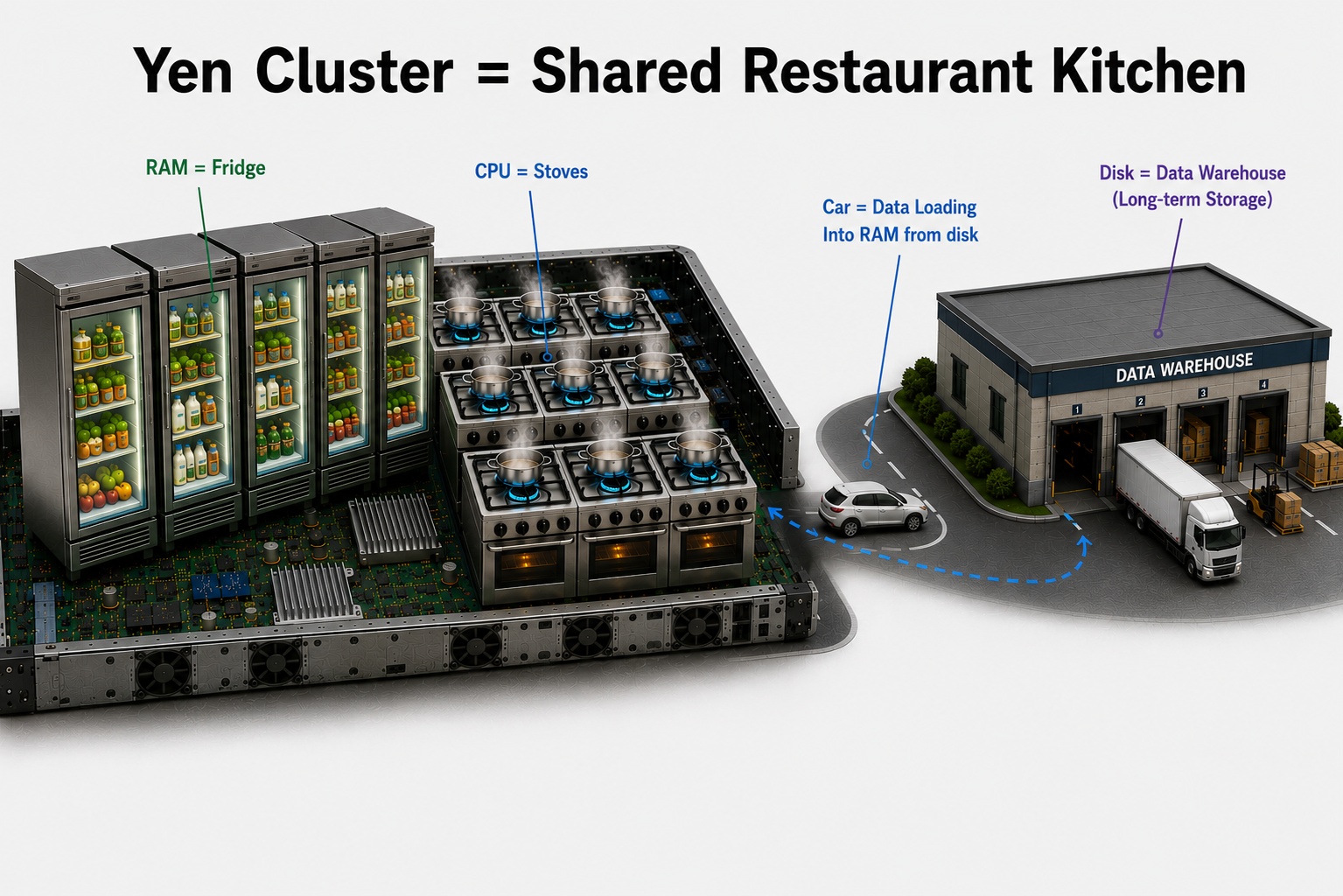
The Yens are a shared restaurant kitchen. Many cooks are working at the same time — you share the burners (CPU cores), the fridge (RAM), and the file system (VAST) with everyone else on the node. They are not infinite. Per-user limits are enforced so one chef can’t claim every burner, but if the kitchen is busy, you feel it.
Shared file system: A file you write on yen1 is instantly visible on every other Yen node — because they all read from and write to the same VAST storage. This is powerful for collaboration, but it also means everyone is hitting the same warehouse at once.
| Component | What it is | Kitchen analogy |
|---|---|---|
| Node | One physical server — each node has its own CPU and RAM, independent from other nodes | A station in the restaurant kitchen — its own stove and fridge |
| CPU | The processor chip — executes your code | The stove |
| CPU core | An individual worker inside the CPU — each runs independently | A single burner |
| RAM | Fast memory the CPU reads from and writes to while working — limited in size | The fridge |
| Storage (disk / file system) | VAST — a shared file system across all nodes, ~1 PB, every node reads and writes the same files | The shared data warehouse |
| I/O (Input/Output) | Moving data from disk into RAM (read) and writing results back to disk (write) — the slowest step | Driving to the warehouse and back |
| Script | The sequence of steps the CPU follows to produce your output | The recipe |
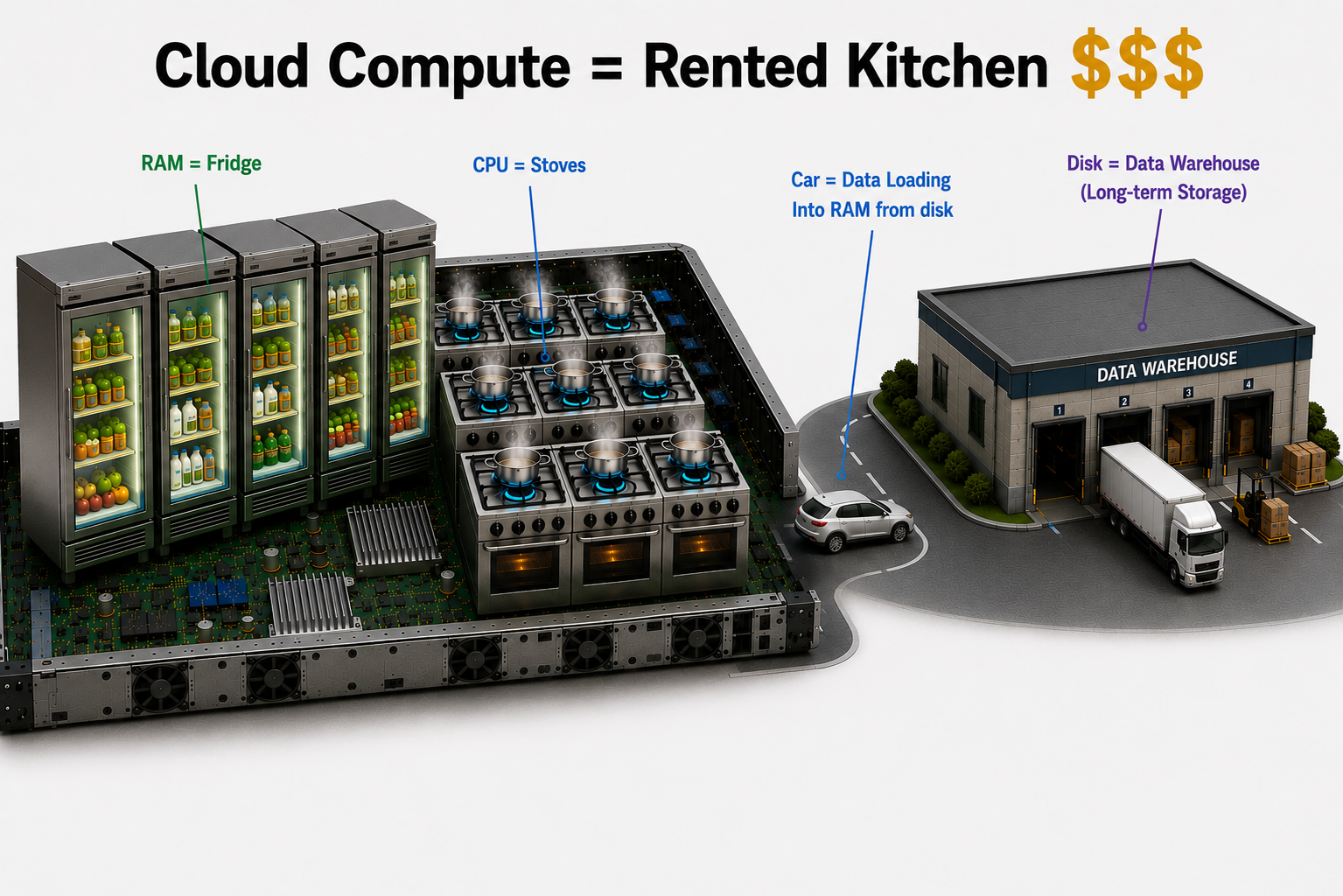
Rented kitchen — cloud (AWS / GCP / Azure)
The cloud is a rented kitchen — and it’s just for you. Unlike the Yens, you’re not sharing burners or fridges with anyone. Cloud gives you flexible and practically infinite compute, memory, and storage: need 1,000 burners for an hour, rent them; need a warehouse the size of a city block, rent it.
You pay for everything you rent, for as long as you rent it. Leaving a large instance running overnight by accident can cost hundreds of dollars. Always shut down what you’re not using.
Main quest — Class Participation
Task: Take part in the class demo and discussion — laptop vs. Yens vs. cloud.
❓ After the demo — discuss these
- What are the tradeoffs between your laptop, the Yens, and the cloud?
- What happens when many researchers all run jobs at once on the shared Yens?
🔮 How to cast your progress — click to reveal
Every quest you check reveals a 🔮 Cast to the leaderboard button with a one-line ./cast spell. To record it:
- SSH to the Yens —
ssh SUNetID@yen.stanford.edu cdto your repo —cd ~/gsb-research-computing-ai-skills- Paste the
./cast …spell from the quest and run it.
Side quests
Finished early? Try any of these.
Side quest — Know your own machine
Work with Claude to figure out how to check your own laptop’s CPU core count and RAM — tell it what operating system you’re on and have it walk you through finding each one. Then enter your specs below to see just how much bigger one Yen node is (yen1 has 256 cores and 1 TB of RAM).
Start Claude on your laptop, not on the Yens — otherwise it’ll report the Yen node’s specs (256 cores, 1 TB), not your own machine’s.
💡 Hint — what to ask Claude
You don’t need a fancy prompt. For example:
Would you help me find the RAM and number of cores on my laptop?
Side quest — Price the rented kitchen
Work with Claude to find on-demand pricing for a cloud VM comparable to a Yen node — 256 cores and 1 TB of RAM, for example on AWS. Then use the calculator below — enter the VM’s specs and the price per hour you found — to estimate what your Day 2 extraction job would cost to run there for an hour. Grant budgets aren’t infinite; this is a real judgment call you’ll make in your own research.
💡 Hint — what to ask Claude
You don’t need a fancy prompt. For example:
Do you have on-demand VM pricing for a cloud VM (say AWS) with 256 cores and 1 TB of RAM?