The Stanford AI Playground
“Can I analyze this data with AI?” is really three questions at once, and you have to satisfy all three: what risk level is the data, what does your Data Use Agreement allow, and what is the machine you’re working on cleared to hold. This room covers those rules, then Stanford’s two ways to work under them — the AI Playground, a chat window you log into with your SUNetID, and the AI API Gateway, which reaches the same class of models from your code. Both put every prompt under a University contract instead of a personal account’s consumer terms. You’ll send your first prompt through the Playground and learn which data you may, and may not, put through it.
🗡️ Main Quest
Quest: Log in to the Stanford AI Playground with your SUNetID credentials, send your first prompt through Stanford’s governed gateway, and know which data-risk levels you may (and may not) send through it.
🖊️ Data Security
Datasets that aren’t public come with rules, and those rules are imposed by three different entities at once. They are independent of each other, they don’t consult each other, and you have to satisfy all three. When they disagree, the strictest one wins.
1. Stanford’s data risk classification
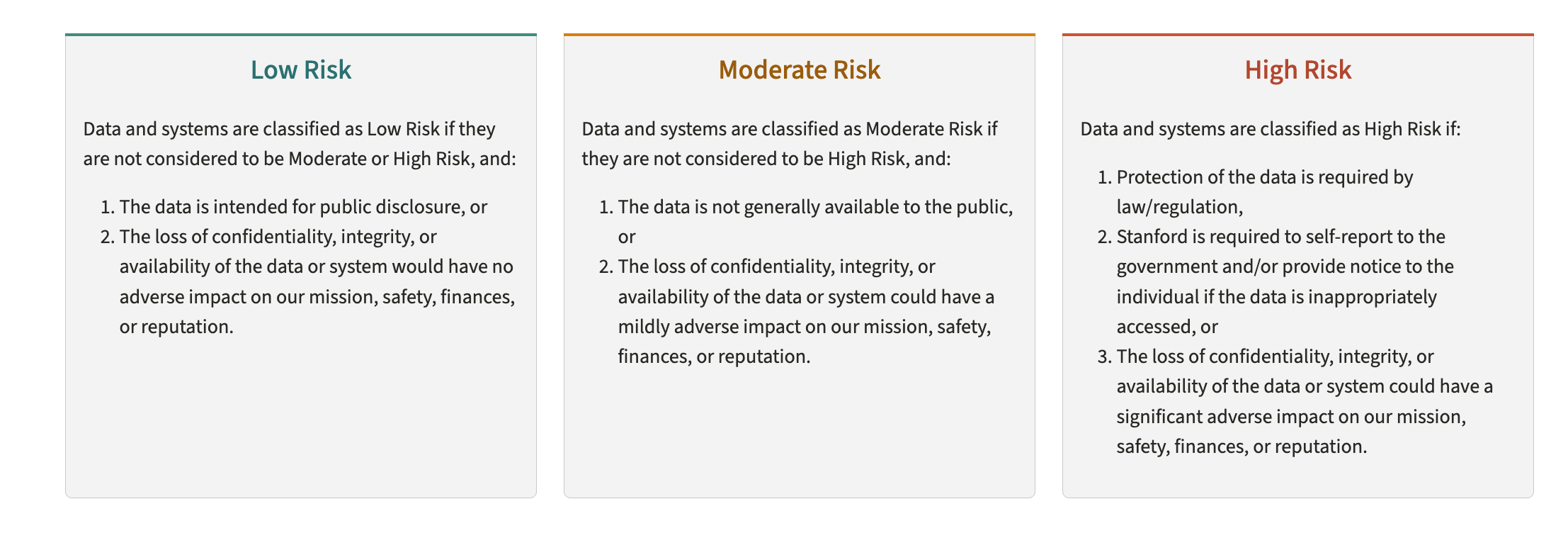
Stanford’s data risk classification guidelines.
Read Stanford’s data risk classification guidance
2. Data Use Agreements (DUAs)
DUAs come from datasets purchased or licensed for faculty use. Stanford’s lawyers negotiate these agreements so you can do cutting-edge research, but the terms vary widely, from permissive to restrictive:
| Example clause | |
|---|---|
| 🟢 Permissive | “You may publish no more than 5% of the data publicly” |
| 🟢 Permissive | “You must keep all analysis on Stanford servers” |
| 🔴 Restrictive | “You may not use ANY form of AI on this data” |
| 🔴 Restrictive | “All analysis must be done on company servers with approved libraries” |
3. The computing system you’re working on
Every system you touch is itself approved up to some maximum risk level, and that ceiling belongs to the machine, not to your data or your good intentions. This is the one researchers forget, because nothing stops you: you can copy a restricted file onto a system that isn’t cleared for it and everything will appear to work fine. The violation is the copy, not the crash.
| Where you’re working | Approved up to |
|---|---|
| The Yens (GSB research computing) | 🟡 Moderate |
| Sherlock (Stanford’s shared HPC cluster) | 🟡 Moderate |
| Carina (secure on-prem cluster for regulated data) | 🔴 High, including PHI |
| Nero GCP (secure cloud platform for regulated data) | 🔴 High, including PHI |
| AI Playground (chat window) | 🔴 High, but not PHI |
| AI API Gateway (from your code) | 🔴 High, including PHI |
| A personal laptop or consumer AI account | 🟢 Low |
So “can I analyze this data with AI?” is really three questions: what risk level is the data, what does my DUA allow, and what is this machine cleared to hold. High-risk data on the Yens fails the third test even when the first two are satisfied.
💡 Know which machine to reach for. The Yens are your home for this course and for most GSB research; their data-risk policy is spelled out in RCpedia. Sherlock is Stanford’s shared HPC cluster, where you go when a job outgrows the Yens — still Moderate, so it is not the answer to a High-Risk problem.
High-Risk work, including anything involving PHI, belongs on a platform built for it, and Stanford runs two: Carina is the on-premises option, run by Stanford Research Computing with the School of Medicine, and it is Slurm-based — so the job scripts you write on Day 3 transfer almost unchanged. Nero GCP is the cloud option, the same idea built on Google Cloud. Both need a PI-led team and go through Stanford’s Data Risk Assessment, so neither is something you spin up on a Tuesday afternoon. Sort that out before you copy a single file, because the moment restricted data lands on a system that isn’t cleared for it, the problem already exists.
You satisfy all three (Stanford’s classification, your DUA, and the ceiling of the system you’re on) so both you and Stanford stay protected.
Improper use of a dataset can mean lawsuits, and losing access to the data or the tools entirely.
🖊️ Exercise: Classify These Five
For each, is it Low, Moderate, or High Risk under Stanford’s definitions above?
- A published, peer-reviewed journal article
- Social Security numbers
- An unreleased internal budget or financial projection
- Student grades and transcripts
- De-identified, aggregated survey data
Discuss as a class: which ones surprised you? Where did opinions differ?
💡 Answer key: click to reveal
| # | Item | Risk | Why |
|---|---|---|---|
| 1 | Published, peer-reviewed article | 🟢 Low | Already public, no restriction on sharing. |
| 2 | Social Security numbers | 🔴 High | Regulated personal identifiers; a textbook High-Risk example. |
| 3 | Unreleased internal budget / projection | 🟡 Moderate | Confidential business information, but not regulated personal data. |
| 4 | Student grades and transcripts | 🟡 Moderate | Education records protected by FERPA. |
| 5 | De-identified, aggregated survey data | 🟢 Low | De-identification and aggregation remove the personal risk. |
A DUA or IRB protocol can push any of these higher: de-identified data that can be re-identified, or a budget under a confidentiality agreement, may need stricter handling. Classify by the data and its contract.
Since AI is permeating every facet of research, Stanford has worked hard to give you a space to submit AI queries with certain guarantees.
🖊️ Stanford’s AI Offerings
Stanford builds and runs two of its own AI services, two different ways in to the same governed idea:
- The AI Playground: a chat window in your browser. Point, click, and type; nothing to install. (This room.)
- The AI API Gateway: API access to the same class of models for your code, over an OpenAI-compatible endpoint (
aiapi-prod.stanford.edu). A separate system you call programmatically. You’ll wire into it from The Key Vault onward.
💡 Two words before we go further, in case they’re new.
An API (Application Programming Interface) is a door into a service built for programs rather than for people. The chat window and the API reach the very same models; what differs is who is standing at the door. You type into a chat window and read the reply yourself. Your code sends a request to an API and gets structured data back that the rest of your script can use.
Why a researcher should care: reading one SEC filing in a chat window is easy. Reading ten thousand of them means a
forloop, and a loop needs a door that code can open. Same models, same Stanford contract, different door.An API key is the credential that opens that door. A server has no other way to know who is knocking, so your key identifies you and carries your permissions and your budget with it. That leads to the two rules you’ll practise next room: keep it secret, because anyone holding it can spend against your account, and never let it end up in your code, a screenshot, a chat window, or a commit. The Key Vault is entirely about handling it properly.
Both put every prompt under one of Stanford’s enterprise agreements rather than a personal account’s consumer terms. The rest of this room walks the chat window first, then the API.
Stanford also brokers access to a growing list of third-party services (each with its own data rules):
| Category | Offering | Provider |
|---|---|---|
| Education accounts | Claude for Education | Anthropic |
| Education accounts | Google Gemini Enterprise | |
| Education accounts | OpenAI ChatGPT Edu | OpenAI |
| Education accounts | Microsoft Copilot | Microsoft |
| Cloud AI | AWS Bedrock | Amazon |
| Cloud AI | Azure OpenAI | Microsoft |
| Cloud AI | Google Vertex |
This list keeps growing. See the full directory for the latest.
🖊️ The AI Playground: A Chat Window
The AI Playground is a University-hosted chat interface that gives every Stanford researcher one safe, governed space to work with many cutting-edge models. You log in with your SUNetID credentials and chat much as you would with ChatGPT, but every prompt is covered by Stanford’s enterprise agreement with the cloud provider instead of consumer terms, and it is cleared for data up to High Risk, but not PHI (protected health information).
It offers many of the same models you’d reach commercially (Claude Opus 4.8, GPT-5.2, and Gemini 2.5 Flash, among others) with no personal account or credit card. (The exact model ids come from the models endpoint you’ll query in The Oracle’s Chamber.)
🔰 Try the AI Playground
Open https://uit.stanford.edu/aiplayground in your browser and log in with SUNetID.
Ask it something:
- “Summarize what a virtual environment is in one sentence.”
- “What is the difference between a kernel and a Python interpreter?”
Notice: the responses come from the same models you’d reach through the API. You’re already using the Stanford AI Playground.
Upsides and Downsides
| Detail | |
|---|---|
| ✅ Free to you | Stanford covers the cost. No credit card to attach and no per-use charge to keep an eye on, unlike a personal ChatGPT or Claude subscription |
| ✅ Stanford’s agreement applies | Your prompts fall under Stanford’s enterprise contract and data processing agreement, not a consumer account’s terms |
| ✅ No account required | Every Stanford researcher has access via SUNetID login |
| ⚠️ Prompts are logged | Stanford can review usage logs, so it isn’t anonymous. The upside: that audited, contracted arrangement is exactly what clears the Playground for sensitive data up to High Risk, though not PHI (and always subject to your DUA) |
| ⚠️ Model selection | Available models are determined by Stanford’s contract, not your preference |
🖊️ The AI API Gateway: API Access
The Playground’s sibling, the Stanford AI API Gateway, exposes the same class of models to your code and is fully OpenAI-compatible. Code that already calls the OpenAI API can call Stanford’s gateway with two changes:
from openai import OpenAI

client = OpenAI(
    api_key="YOUR_STANFORD_KEY",           # Stanford-issued key, not OpenAI key
    base_url="https://aiapi-prod.stanford.edu/v1",  # Stanford gateway, not api.openai.com
)
Here’s what happens on the wire when that code runs:
Every model call, prompt, and response flows through aiapi-prod.stanford.edu, Stanford’s contracted endpoint, instead of going straight to the provider. Your code looks identical; only the endpoint changes.
Why Stanford Runs Its Own Server
That gateway is a server Stanford stands up and maintains itself, placed between your code and the model provider on purpose. Owning the middle is what lets the University put every request under its contract with the provider (the DPA), authenticate you through SUNetID, enforce budget caps, and keep an audit trail. Send data straight to a vendor on a personal account instead, and none of those protections apply. One governed door for all of campus beats thousands of ungoverned ones.
The chat window and the API have different PHI ceilings. The Playground chat window is cleared for data up to High Risk but not PHI (protected health information). The API Gateway is approved for High Risk including PHI (always subject to your DUA). So when PHI is involved, reach for the API path, not the chat window.
The API Gateway Is Metered
Here’s the other way the two services differ, and it’s the one that surprises people. The chat window is free to you — type all day, nothing accrues. The API Gateway is pay-per-use: every call is billed on the amount of text you send plus the amount the model generates back, at a rate that depends on which model you picked. That’s what the budget cap in the diagram is capping.
At the scale of today — a handful of calls on one filing — this is fractions of a cent, and you’re spending against a shared course key rather than your own. It starts to matter the moment a for loop is involved. Ten thousand filings is ten thousand billable calls, and the difference between the cheapest and most expensive model on the menu is not small.
So two habits, starting now: know that a loop over documents is a loop over charges, and measure the cost on a few records before you launch the full run. The Crucible takes this apart properly later today — what drives the bill, how to estimate one from a sample, and the trap where a model charges you for reasoning you never see.
Requesting Your Own Key
Today you’re using the shared course key. If you or your PI need a personal Stanford AI API Gateway key later, you’ll submit a request with:
- Organization: Stanford University, Stanford Health Care (SHC), or Stanford Children’s Health (SCH)
- Requester: yourself, someone else, or your department/service team
- Model(s): which AI model(s) you need access to
- Key alias: a short, descriptive, alphanumeric name (20 characters max)
- Business purpose: what the key will be used for
- Budget: your maximum monthly spend
- Volume: approximate number of requests per day
- Due date: when you need the key by
- Billing: your Project, Task, and Award (the PTA), plus an approver for the billing account if your request requires approval (Ask Your Advisor)
If your request needs approval, the designated approver gets notified before the key is issued. If you’re the designated approver yourself, the request is auto-approved.
In the next room (The Key Vault), you’ll load the key securely from a .env file rather than hardcoding it.
Side quests
Finished early? Try any of these.
🌐 All three happen in the AI Playground chat window in your browser — the same tab you logged into above. No code, no API key, nothing to install. You’re exploring what the chat window can do before you start driving the same models from Python.
Side quest: Save a Course Context Prompt
In the AI Playground, save a reusable prompt that gives the AI quick background on the class you’re taking: what the course is, what you’re working on, and what tools you have access to. Paste it in at the top of a new conversation instead of re-explaining yourself every time.
Side quest: Compare Two Models
In the AI Playground, use the model picker to ask two different cutting-edge models the same Yen-specific question. Compare the answers: which one do you trust more, and why?
Side quest: Customize the System Prompt
In the AI Playground, set the system prompt so the AI knows who you are, your current knowledge level, and how you like to be spoken to. Ask the same question with the system prompt empty versus filled in, and see whether the tone or depth actually changes.
🧠 Skills Learned
- Stanford AI Playground gives every researcher access to models such as Claude Opus 4.8, GPT-5.2, and Gemini 2.5 Flash; no personal account needed
- The AI Playground (a chat window) and the AI API Gateway (API access for code) are two separate Stanford services: the chat window is cleared to High Risk but not PHI, while the API Gateway handles High Risk including PHI
- The chat window is free to you; the API Gateway is metered per call, billed on text in plus text out, which is why a loop over 10,000 documents is a budgeting decision and not just a coding one
- The API is OpenAI-compatible: only
base_urland the key change; all code is the same - Prompts sent through either service are logged and subject to audit; classify your data before sending it