Compute Environments
Reference for the hardware terms Day 2 uses — here so you can look a number back up after the room has emptied.
Every machine you will run research code on — your laptop, a Yen, a cloud instance — is built from the same few physical parts. What changes between them is how much of each part you get, and who else is competing for it.
The Parts
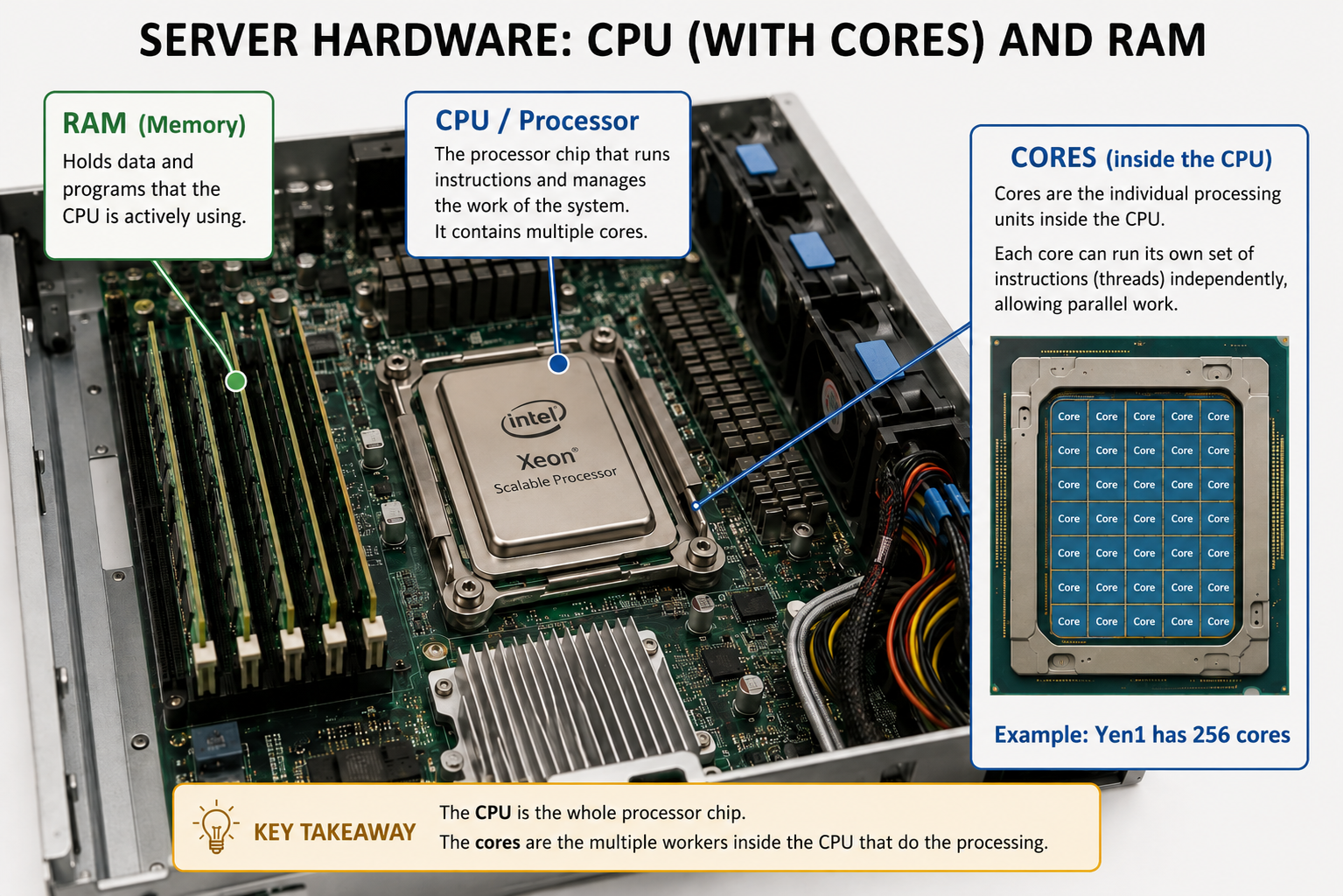
An AI rendering of a Yen server opened up.
| Component | What it is |
|---|---|
| CPU | The processor chip — executes your code |
| CPU core | An individual worker inside the CPU; each runs independently, which is what makes parallel work possible |
| RAM | Fast memory the CPU reads from and writes to while working — limited in size |
| Storage (disk / file system) | Where your files live when nothing is running — large, but slow to reach |
| I/O (input/output) | Moving data from disk into RAM and writing results back — almost always the slowest step |
| Script | The sequence of steps the CPU follows to produce your output |
What Happens When You Run a Script
When you run python scripts/extract_form_3_one_file.py, four things happen in order:
- Load from disk — Python reads your script and data files from storage.
- Into RAM — the data lands in memory, where the CPU can reach it quickly.
- CPU does the work — cores execute the steps in your script against what’s in RAM.
- Save to disk — results are written back to storage so they survive the run.
Watch the first leg. Getting data from disk into RAM is the slow one; once it’s close to the processor, the rest is quick:
Reading from storage is slow — by a factor of about a thousand. Your CPU reaches data in RAM in roughly 100 nanoseconds; a request to Yen storage lands in the few-hundred-microsecond range. That cost is paid per request, so a few large reads beat many small reads or writes. And if your dataset does not fit in RAM all at once, your script keeps going back to storage mid-computation, and that is what makes a job crawl. This is why knowing how much RAM your script needs matters — on the cluster, and on your laptop too.
Yen storage is all-flash (VAST), so the drives are not the bottleneck; the network between your node and the storage is.
Three Places Your Code Can Run
Your Laptop
Yours alone, and small: a handful of cores, RAM measured in single-digit gigabytes, and a disk that is bigger than RAM but far slower to reach. Nothing competes with you, and nothing helps you either — when you close the lid, the work stops.
The Yens — Shared
A Yen node has far more of everything: yen1 has 256 cores and roughly 1 TB of RAM.
But you share it. Cores, RAM, and the file system are all contended, and they are not
infinite. Per-user limits are enforced so that one person cannot claim a whole node —
see the current limits — but when
the cluster is busy, you feel it.
Shared file system. A file you write on
yen1is instantly visible on every other node, because they all read and write the same VAST storage (~1 PB). That is what makes collaboration easy — and it also means everyone is hitting the same storage at once.
A node is one physical server, with its own CPU and RAM, independent of the others. That distinction matters later today: a job asking for more cores than any single node has will never start, however much the cluster has in total.
The Cloud — Rented
AWS, GCP, and Azure rent you a machine that is yours alone and effectively unlimited: need 1,000 cores for an hour, rent them; need a petabyte, rent it. No queueing behind other researchers.
You pay for everything you rent, for as long as you rent it — not for what you use. Leaving a large instance running overnight by accident costs real money, and the bill arrives whether the machine did anything or not. Shut down what you are not using.
For most GSB research, the Yens are the right answer: no per-hour cost, data stays on Stanford-managed infrastructure, and your PI already has access to the same project storage. The cloud earns its keep when you need something the Yens do not have, or need it faster than the queue will give it to you.
Where This Shows Up in the Lab
The three numbers every script needs — compute time, cores, and RAM — are the ones you measure in 1. Profile and then declare in 3. Submit. You cannot read them off the code; you have to measure them while it runs.