AI Services & Data Privacy
Before using AI with research data, check the data’s risk classification, the dataset’s usage rules, and the service’s approval. Your use must meet all three requirements.
You’ll try Stanford’s AI Playground in your browser, then use Anthropic’s API from Python to process public SEC filings. These are separate services with different access and data-handling rules.
Exercise
In this section: Check which data a service can handle, try Stanford’s AI Playground, and distinguish an LLM, an API, and an agent harness. Then review what your code or agent sends to the model service.
Check the Data and Service
1. Stanford’s data-risk classification
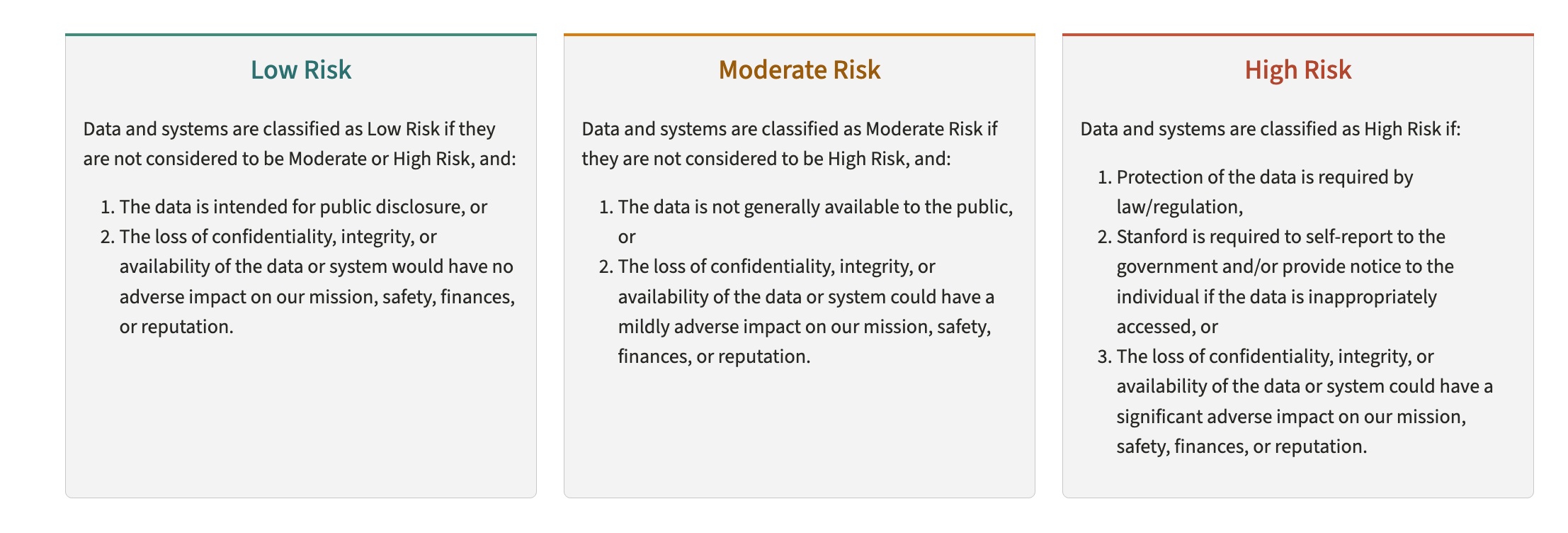
Read Stanford’s current data-risk classification guidance.
2. The dataset’s rules
A Data Use Agreement (DUA), license, IRB protocol, or contract can impose stricter rules than a service technically supports. “De-identified” does not automatically mean “safe to send to AI,” and a vendor license may forbid automated analysis entirely.
3. The system and service
The Yens, a Stanford-managed AI service, and a vendor API are separate systems with different approvals. A file can be allowed on one and forbidden on another. Nothing in Python checks whether a transfer is permitted. Check the requirements before sending data.
| Service | Role in this course | Data requirements |
|---|---|---|
| Stanford AI Playground | Manual browser demonstration | Follow Stanford’s current approval and the dataset’s rules |
| Stanford AI API Gateway | Institutional programmatic option, discussed for context | Use its current approval process, DRA/DUA, and project requirements |
| Direct Anthropic API | The SEC extraction exercises | Public, Low Risk filings only |
For current service approvals, check AI services at Stanford and the AI API Gateway FAQ before using research data.
Direct access to Anthropic is not the same service as Claude provisioned by Stanford and is not a shortcut around a DUA, IRB, Data Risk Assessment, or platform restriction. In this course it is limited to public SEC filings. For Moderate or High Risk data, stop and use the Stanford-approved route for that project.
Practice: Classify the Data
For each item, decide whether it is Low, Moderate, or High Risk, then ask whether a DUA could make the handling requirements stricter.
- A published journal article
- Social Security numbers
- An unreleased internal financial projection
- De-identified, aggregated survey results
Answer key
| # | Item | Starting classification | Why |
|---|---|---|---|
| 1 | Published article | Low | Already public |
| 2 | Social Security numbers | High | Regulated personal identifiers |
| 3 | Internal projection | Moderate | Confidential business information |
| 4 | De-identified aggregate results | Often Low | Re-identification and contract terms still matter |
The classification is only the first check. A DUA, IRB protocol, or other agreement can require stricter treatment.
Stanford’s Browser and API Routes
AI Playground: an easy place to start
For everyday research questions, drafting, and trying prompts, Stanford’s AI Playground is usually the easiest starting point. You use it in a browser with your SUNetID; there is no Python setup or API key to manage. You can choose among the available models and compare their responses. Follow the data checks above before uploading material.
Try the Playground
- Open the Stanford AI Playground quick start page, follow its link to the Playground, and sign in with your SUNetID.
-
Choose an available model and send this prompt:
Explain the difference between a Python interpreter and a Jupyter kernel in two sentences.
- Ask a follow-up question. If time allows, try the same prompt with another model and compare the answers.
Why use an API for this exercise? We want a Python script to read filings, send the same extraction instructions for each one, validate the responses, and save the results. An API lets those steps run together without manually copying text between a browser and a file. The Playground remains useful for testing a prompt before putting it into code.
Stanford Claude and ChatGPT Education Accounts
Stanford also provides university-managed accounts for Claude for Education and ChatGPT Edu. These give you access to the providers’ own apps for research, writing, analysis, and coding.
| Account | What you can use | Sign up |
|---|---|---|
| Claude for Education | Claude Chat, Claude Code, and Claude Cowork | Request a Standard account |
| ChatGPT Edu | ChatGPT for research and analysis, document creation, and coding tools including Codex | Request a Standard account |
The Standard accounts are free for active Stanford faculty, students, postdocs, and staff. Use your SUNetID to request access. The service pages above also list affiliate options, paid tiers, and the current data rules for each tool.
The Claude education account connects to the Claude Code work you did earlier. For the upcoming Python exercises, you’ll use the course’s separate Anthropic API key. Requesting an education account does not replace that setup.
AI API Gateway: Stanford’s programmatic route
The Stanford AI API Gateway lets code call models under Stanford’s service controls. It remains the institutional route to evaluate when a research project needs Stanford governance, sensitive-data approval, centralized budget controls, or access to several providers through one API.
Use the Playground in your browser. Use the Gateway when you want code to call a Stanford-managed AI service.
How the Gateway Works
Your code sends its request to Stanford’s Gateway with a Stanford-issued API key. The Gateway checks the key’s model access and budget, routes the request to the model service, and returns the response. Stanford manages the service and its provider agreements.
The request and response both pass through Stanford’s Gateway.
Request a Gateway Key for Your Research
The Gateway is billed by usage and requires a PTA (Project, Task, and Award). Agree on the billing account and budget with your advisor or project lead first.
- Open Stanford’s Add AI API Gateway Key form and sign in with your SUNetID.
-
Prepare the request details:
Detail What to provide Organization and requester Your institution and who will own the key Models The models your project needs Key alias and purpose A short name and description of the research use Budget and volume Maximum monthly spend and estimated requests per day Due date When you need access Billing Your PTA and the appropriate billing approver - Submit the request and complete any required approval. Stanford sends the key through secure email after processing the request.
- Follow the setup instructions linked from the Gateway service page. Keep the key out of source code, prompts, and Git.
The monthly budget is a spending cap, not a flat fee. For current billing and access details, see the Gateway FAQ.
For a future research project: These are the steps for requesting your own Stanford Gateway key. Today’s exercises use the course’s separate Anthropic key, so you can continue without submitting this request.
Keep Sensitive Material Out of Context
- Keep API keys in
.env, exclude that file from Git, and do not paste its contents into prompts or print them in notebook output or logs. - Use public or synthetic examples when writing and testing code. Keep real restricted records out of comments, example prompts, and error output.
- Give an agent access only to the files it needs. Review its actions before letting it read additional data or run commands that might print records.
- Check the tool’s access controls. A Git ignore rule prevents a file from being tracked; it does not necessarily prevent an agent from reading it.
Next, Managing API Keys shows you how to set up your Anthropic API key and keep it out of Git. In the extraction checkpoint, you’ll measure token usage and check results before scaling the pipeline.
Quiz
Answer each one in your head, then open it to check.
1You want to compare different model providers' answers to the same prompt without writing code. Where would you start?
Stanford’s AI Playground. Sign in through your browser and send the same prompt to available models from different providers. Compare their responses to see how the answers differ.
2Does this course's Python script send its requests through Stanford's AI API Gateway?
No. It calls Anthropic’s API directly using the course’s ANTHROPIC_API_KEY.
Stanford’s Gateway uses a separate key and service setup. Your Claude education account
is also separate from the key used by the exercise’s Python client.
3You started an agent on the Yens. Does that mean its model runs on the Yens too?
No. The harness and model can run on different systems. When the harness calls a remote model, the context it includes leaves the Yens. Check which service the tool connects to, even when you launch it from a cluster terminal.
4An AI service supports your data's risk level, but the dataset's agreement forbids AI analysis. Is the service's approval enough?
No. You need to meet the dataset’s rules as well. Check all three: the data’s risk classification, the agreement governing its use, and the system and service approvals. A service’s technical capabilities do not override the dataset’s restrictions.
5You added a restricted file to .gitignore. Does that stop a coding agent from reading it?
Not necessarily. .gitignore controls which untracked files Git normally includes;
it is not a general file-access control. Check the agent’s permissions and limit its
access to the files needed for the task.
6Claude Code reads a Python script that refers to data/survey.csv, but it has not opened the CSV. Does reading the script also send the CSV's contents to the model?
No. Reading a file path does not read the file it points to. The model can see
data/survey.csv in the script without receiving any survey rows.
If Claude Code later opens the CSV or runs a command that prints its rows, that output may be sent to the model. Check what the agent actually reads and includes in its requests. A filename can also reveal information, even without the file’s contents.
Skills Learned
- Choose the Playground for browser-based work and an API for scripted requests
- Distinguish the model, its API, and the agent harness that manages tools and context
- Check data classification, dataset rules, and service approval before sending data
- Identify what a script or harness sends to a remote model
- Use Anthropic’s direct API with the course’s public filings