1. Yen-Slurm Cluster
In this session, we will be working with the scheduled Yens.
The yen-slurm is a computing cluster designed to give researchers the ability to run computations that require a large amount of resources without leaving the environment and filesystem of the interactive Yens.
Yen Computing Infrastructure
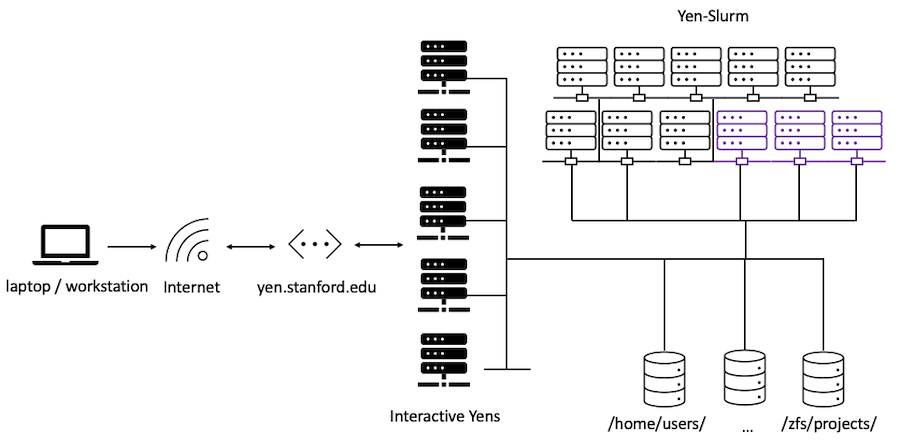
The yen-slurm cluster has 11 nodes with over 1,500 CPU cores, 10 TB of memory, and 12 NVIDIA GPU’s.
What is a Scheduler?
The yen-slurm cluster can be accessed by the Slurm Workload Manager. Researchers can submit jobs to the cluster, asking for a certain amount of resources (CPU, Memory, GPUs and Time). Slurm will then manage the queue of jobs based on what resources are available. In general, those who request less resources will see their jobs start faster than jobs requesting more resources.
Why Use a Scheduler?
A job scheduler has many advantages over the directly shared environment of the yens:
- Run jobs with a guaranteed amount of resources (CPU, Memory, GPUs, Time)
- Setup multiple jobs to run automatically
- Run jobs that exceed the community guidelines on the interactive nodes
- Gold standard for using high-performance computing resources around the world
Preparing to Use a Scheduler
First, you should make sure your process can run on the interactive Yen command line.
Once your process is capable of running on the interactive Yen command line, you will need to create a slurm script. This script has two major components:
- Metadata around your job, and the resources you are requesting
- The commands necessary to run your process
Looking at Cluster Queue
You can look at the current job queue by running squeue:
squeue
You should see the output for all jobs currently running and pending in the queue:
             JOBID PARTITION     NAME     USER ST       TIME  NODES NODELIST(REASON)
              1043    normal    a_job    user1 PD       0:00      1 (Resources)
              1042    normal    job_2    user2  R    1:29:53      1 yen11
              1041    normal     bash    user3  R    3:17:08      1 yen11
Jobs with state (ST) R are running, and PD are pending. Your job will run based on this queue.
Best Practices
Use all of the resources you request
The Slurm scheduler keeps track of the resources you request, and the resources you use. Frequent under-utilization of CPU and Memory will affect your future job priority. You should be confident that your job will use all of the resources you request. It’s recommended that you run your job on the interactive Yens, and monitor resource usage to make an educated guess on resource usage.
Restructure Your job into Small Tasks
Small jobs start faster than big jobs. Small jobs likely finish faster too. If your job requires doing the same process many times (i.e. OCR’ing many PDFs), it will benefit you to setup your job as many small jobs.
Current Partitions and their limits
Run sinfo command to see available partitions:
sinfo
You should see the following output:
PARTITION AVAIL  TIMELIMIT  NODES  STATE NODELIST
normal*      up 2-00:00:00      8   idle yen[11-18]
dev          up    2:00:00      8   idle yen[11-18]
long         up 7-00:00:00      8   idle yen[11-18]
gpu          up 1-00:00:00      3   idle yen-gpu[1-3]
The first column PARTITION lists all available partitions. Partitions are the logical subdivision of the yen-slurm cluster. The * denotes the default partition.
The four partitions have the following limits:
| Partition | CPU Limit Per User | Memory Limit | Max Memory Per CPU (default) | Time Limit (default) |
|---|---|---|---|---|
| normal | 256 | 3 TB | 24 GB (4 GB) | 2 days (2 hours) |
| dev | 2 | 48 GB | 24 GB (4 GB) | 2 hours (1 hour) |
| long | 50 | 1.2 TB | 24 GB (4 GB) | 7 days (2 hours) |
| gpu | 64 | 256 GB | 24 GB (4 GB) | 1 day (2 hours) |
You can submit to the dev partition by specifying:
#SBATCH --partition=dev
Or with a shorthand:
#SBATCH -p dev
If you don’t specify the partition in the submission script, the job is queued in the normal partition. To request a particular partition, for example, long, specify #SBATCH -p long in the slurm submission script. You can specify more than one partition if the job can be run on multiple partitions (i.e. #SBATCH -p normal,dev).
How do I check how busy the machines are?
You can pass format options to the sinfo command as follows:
sinfo --format="%m | %C"
You should see:
MEMORY | CPUS(A/I/O/T)
257366+ | 268/1300/0/1568
where MEMORY outputs the minimum size of memory of the yen-slurm cluster node in megabytes (256 GB) and CPUS(A/I/O/T) prints the number of CPU’s that are allocated / idle / other / total. For example, if you see 268/1300/0/1568 that means 268 CPU’s are allocated, 1,300 are idle (free) out of 1,568 CPU’s total.
You can also run checkyens and look at the last line for summary of all pending and running jobs on yen-slurm.
checkyens
You should see the following:
Enter checkyens to get the current server resource loads. Updated every minute.
yen1 :  2 Users | CPU [####                20%] | Memory [####                20%] | updated 2024-06-20-07:58:00
yen2 :  2 Users | CPU [                     0%] | Memory [##                  11%] | updated 2024-06-20-07:58:01
yen3 :  2 Users | CPU [                     0%] | Memory [                     3%] | updated 2024-06-20-07:57:04
yen4 :  3 Users | CPU [####                20%] | Memory [###                 15%] | updated 2024-06-20-07:58:00
yen5 :  1 Users | CPU [                     1%] | Memory [                     3%] | updated 2024-06-20-07:58:02
yen-slurm : 11 jobs, 5 pending | 3 CPUs allocated (1%) | 100G Memory Allocated (2%) | updated 2024-06-20-07:58:02